Evaluating the Happy Halloween Editable Text Effect for Professional Design Workflows
In the fast-paced world of digital marketing and graphic design, seasonal campaigns require both speed and visual impact. As October approaches, brands, content creators, and small business owners scramble to produce thematic assets that capture attention without sacrificing brand integrity. This is where specialized resources like the Happy Halloween Editable Text Effect become valuable tools in a designer’s arsenal. Rather than building complex typography from scratch, professionals can leverage pre-styled, fully customizable assets to maintain high production standards while meeting tight deadlines.
This article examines the practical utility of this specific text effect package, analyzing its technical specifications, versatility across media formats, and suitability for various professional workflows. By understanding the underlying structure and capabilities of these files, designers can make informed decisions about integrating them into their projects for social media, print publications, and web designs.
Technical Foundation and Customization Capabilities
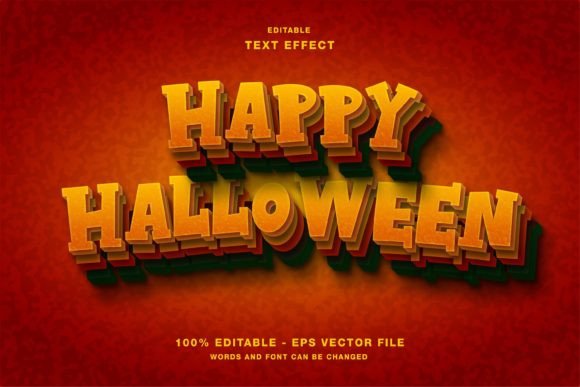
The core value of any editable text effect lies in its flexibility. The Happy Halloween Editable Text Effect is designed specifically for Adobe Illustrator, a vector-based software that remains the industry standard for scalable graphic design. Unlike raster-based effects that may lose quality when resized, this asset utilizes vector paths, ensuring crisp edges and clean lines regardless of the output size. This distinction is critical for professionals who need to adapt a single design element for multiple platforms, from a small Instagram story to a large-format event poster.
One of the most significant features of this package is its true editability. Many free or low-quality templates offer static images with fake text overlays, requiring users to manually match fonts and colors—a time-consuming and often imprecise process. In contrast, this effect allows users to easily edit all elements and change the text directly. The underlying structure is organized logically, enabling designers to swap out placeholder copy with their own headlines, calls to action, or promotional messages without disrupting the stylistic integrity of the effect. This level of customization ensures that the final output aligns seamlessly with specific campaign goals and brand guidelines.
The package includes both EPS and JPG files in the main folder. The inclusion of EPS (Encapsulated PostScript) files is particularly important for professional workflows, as it preserves vector data and layer structures. The JPG files serve as useful previews or quick-reference assets for clients who may not have access to design software. This dual-format approach demonstrates a thoughtful consideration of different user needs, from hands-on designers to project managers reviewing mockups.
Color Mode and Digital Optimization
A notable technical specification of this text effect is its RGB color mode. While traditional print design often relies on CMYK, the dominance of digital channels in modern marketing makes RGB the more versatile choice for many contemporary projects. RGB (Red, Green, Blue) is the native color space for screens, including smartphones, tablets, computer monitors, and digital signage. By optimizing the Happy Halloween Editable Text Effect for RGB, the creator ensures that colors appear vibrant and accurate on digital platforms.
This focus on digital optimization makes the asset particularly well-suited for:
- Social Media Promotions: Headlines for Instagram posts, Twitter updates, and Facebook ads benefit from the bright, eye-catching hues that RGB supports. The effect can be used to create engaging visuals that stand out in crowded feeds.
- Web Design Elements: Website banners, landing page headers, and blog post graphics require fast-loading, high-quality assets. The vector nature of the file ensures scalability for responsive web design, while the RGB mode guarantees color consistency across browsers.
- Digital Publications: Online magazines, newsletters, and email marketing campaigns can utilize these text effects to add thematic flair without compromising load times or visual clarity.
However, professionals should be aware of the implications of using RGB for print. If the intention is to use this effect in physical materials such as flyers, posters, or magazine ads, a color conversion may be necessary. While modern printing techniques can handle RGB files, converting to CMYK beforehand allows for better control over color accuracy and prevents unexpected shifts in hue. Designers should test prints before full-scale production to ensure the spooky aesthetics translate effectively to paper.
Versatility Across Media Formats
The adaptability of the Happy Halloween Editable Text Effect extends beyond digital screens. Its vector foundation makes it a viable option for various print applications, provided proper color management is observed. For event promoters, this tool can streamline the creation of cohesive marketing materials. Imagine a local haunted house attraction needing consistent branding across ticket stubs, entrance banners, and social media teasers. Using a single editable text effect ensures typographic consistency, reinforcing brand recognition and professional presentation.
For educators and publishers, the ease of editing allows for quick customization of classroom materials or seasonal newsletter headers. A teacher might use the effect to create engaging titles for Halloween-themed lesson plans, while a publisher could incorporate it into the cover design of a seasonal magazine issue. The ability to rapidly iterate on text content means that last-minute changes—common in dynamic publishing environments—can be accommodated without starting from scratch.
Freelancers and small business owners also stand to benefit significantly. These groups often operate with limited resources and tight budgets. Investing in a high-quality, reusable asset like this text effect reduces the time spent on routine design tasks, allowing them to focus on strategy and client acquisition. The professional finish of the effect helps elevate the perceived value of their services, demonstrating attention to detail and design sophistication.
Practical Considerations and Limitations
While the Happy Halloween Editable Text Effect offers substantial benefits, it is essential to approach its use with a realistic understanding of its scope. First, proficiency in Adobe Illustrator is required to fully leverage the editable features. Users unfamiliar with vector software may find the learning curve steep, although numerous tutorials are available online. Second, while the effect is highly customizable, it is still bound by its initial design parameters. Designers looking for completely unique, avant-garde typography may need to modify the base effect significantly or combine it with other design elements to achieve a distinct look.
Another consideration is the trend lifecycle. Halloween aesthetics evolve, with certain styles falling in and out of favor. While classic spooky themes tend to have longevity, designers should evaluate whether the specific style of this text effect aligns with current design trends and their target audience’s preferences. Using outdated visual cues can inadvertently date a campaign. Therefore, it is advisable to use the effect as a foundation, adding contemporary design elements such as modern layouts, minimalistic backgrounds, or trending color palettes to keep the overall composition fresh.
Who Benefits Most from This Asset?
This resource is ideal for a diverse range of professionals:
- Digital Marketers: Who need rapid turnaround times for seasonal campaigns across multiple social platforms.
- Graphic Designers: Seeking to expand their library of reliable, high-quality assets for client work.
- Small Business Owners: Managing their own branding and looking for professional-grade tools without hiring external agencies.
- Content Creators: Bloggers and influencers who want to enhance their visual storytelling with thematic typography.
- Educators and Publishers: Creating engaging, seasonally relevant materials for students and readers.
In conclusion, the Happy Halloween Editable Text Effect represents a practical solution for professionals seeking efficiency without compromising quality. Its vector-based structure, RGB optimization, and full editability make it a versatile tool for both digital and print applications. By understanding its strengths and limitations, designers can integrate this asset into their workflows effectively, producing compelling Halloween-themed content that resonates with audiences and meets professional standards. Whether used for a quick social media update or a comprehensive print campaign, this text effect offers a reliable foundation for creative expression during the spooky season.