Mastering the Cake 3D Editable Text Effect for Professional Design Results
In the fast-paced world of digital marketing and social media engagement, visual appeal is not just a bonus; it is a necessity. Whether you are crafting a headline for an Instagram post, designing a flyer for a local event, or creating a magazine cover, the typography you choose can make or break your message. This is where the Cake 3D Editable Text Effect becomes an invaluable asset for creators of all skill levels. It offers a playful yet professional aesthetic that stands out in crowded feeds and print materials alike. However, simply downloading a template is not enough to guarantee success. Many designers, from beginners to seasoned professionals, overlook critical details that can compromise the quality of their final output.
Understanding the Versatility of 3D Text Templates
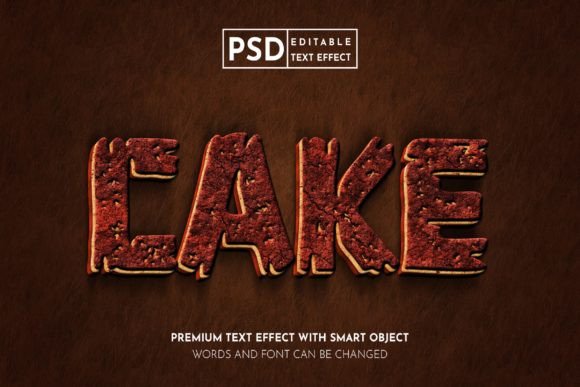
The primary attraction of this specific text effect lies in its adaptability. Designed with Smart Objects in Photoshop, it allows users to swap out placeholder text with their own copy while maintaining complex lighting, shadows, and textures automatically. This technology saves hours of manual rendering time. The "cake" aesthetic—often characterized by soft, rounded edges, pastel or vibrant colors, and a tactile, almost edible appearance—resonates well with audiences looking for warmth and approachability. It is particularly effective for birthday promotions, bakery advertisements, children’s events, and lifestyle branding.
However, a common misunderstanding is that these templates are one-size-fits-all solutions. While they are highly customizable, they require a nuanced approach to ensure they align with your brand identity and technical requirements. Ignoring the underlying structure of the file can lead to distorted visuals or inefficient workflows.
Avoiding Common Pitfalls in Color Management
One of the most frequent mistakes designers make involves color modes. The Cake 3D Editable Text Effect is optimized for the RGB color mode. This is crucial because RGB (Red, Green, Blue) is the standard for digital screens, including websites, social media platforms like Twitter and Facebook, and digital publications. If you intend to use this design for a physical print project, such as a poster or magazine, you might be tempted to convert the file to CMYK immediately. Doing so prematurely can result in significant color shifts, making your vibrant cake-like textures appear dull or muddy.
To avoid this, always keep your working file in RGB until the very final stage of export. If you are designing for web use, stick strictly to RGB to ensure the colors pop on smartphone screens and monitors. For print purposes, check if the provider offers a CMYK-compatible version or consult with your printer about how best to handle the conversion after finalizing your design. Neglecting this step often leads to dissatisfaction when the printed material does not match the digital proof.
Misusing Smart Objects and Layer Structures
The power of this PSD file lies in its Smart Object layers. A prevalent error among beginners is rasterizing these layers too early. When you rasterize a Smart Object, you lose the ability to edit the text non-destructively. This means if you spot a typo or want to change the wording after applying effects, you must start over. Always double-click the Smart Object thumbnail to open the separate document, edit your text there, save, and close it. This updates the main composition automatically.
Another oversight is ignoring the hierarchy of effects. The 3D look is achieved through a combination of bevels, embosses, drop shadows, and inner glows. Users sometimes tweak these individual layer styles without understanding how they interact. For instance, increasing the opacity of a shadow without adjusting its distance can make the text look flat rather than three-dimensional. Take time to explore the layer panel. Understanding which layers control the highlight versus the shadow will give you greater control over the depth and realism of your cake-text effect.
Overlooking Resolution and Scalability
When using text effects for different mediums, resolution matters. A design that looks crisp on an Instagram story may appear pixelated on a large event banner. The included JPG files in the main folder are useful for quick previews or low-stakes social media posts, but they are not suitable for high-quality print work. Always work with the PSD file at a high resolution, typically 300 DPI for print and 72-150 DPI for web, depending on the display size.
Before finalizing your project, zoom in to 100% or more to check for jagged edges or artifacts around the text. If the text appears blurry, ensure that your font choice is compatible with the 3D extrusion settings. Some intricate script fonts may not render well with heavy 3D effects, leading to illegible results. In such cases, switching to a bolder, simpler typeface can improve readability while maintaining the aesthetic appeal.
Ensuring Brand Consistency and Readability
While the visual flair of the Cake 3D effect is enticing, it should never overshadow the message. A common mistake is choosing colors that clash with the background or reduce contrast. Remember that accessibility is key. If your text is light-colored with a subtle shadow, placing it against a busy or light background will make it hard to read. Always test your design against various backgrounds. Use solid colors or blurred images behind the text to ensure legibility.
Furthermore, consider your audience. While this effect is playful, it may not suit serious corporate communications or luxury brands aiming for minimalism. Evaluate whether the whimsical nature of the cake texture aligns with your brand voice. If used appropriately, it can humanize a brand and increase engagement. If misused, it can appear unprofessional. Context is everything.
Maximizing Efficiency with Proper File Organization
Finally, do not neglect the organizational aspect of your workflow. The main folder includes both PSD and JPG files. Keep these organized in dedicated project folders. Rename your layers clearly if you add additional elements. This practice is especially important for freelancers and agencies who may need to revisit projects months later or hand them off to clients. A disorganized file can lead to confusion and wasted time trying to locate specific editable elements.
By paying attention to color modes, respecting the Smart Object workflow, checking resolution, and ensuring readability, you can leverage the Cake 3D Editable Text Effect to create stunning, professional-grade designs. Whether you are promoting a sale on Facebook or designing a magazine header, these practical adjustments will help you avoid common pitfalls and achieve a polished, eye-catching result that truly resonates with your audience.