Evaluating the Chinese New Year Text Effect for Modern Digital and Print Campaigns
As the Lunar New Year approaches, brands and content creators face the recurring challenge of balancing cultural authenticity with modern design aesthetics. The Chinese New Year Text Effect has emerged as a specialized design asset that bridges this gap, offering a pre-styled typographic solution that captures the festive spirit without requiring hours of manual illustration. For designers, marketers, and small business owners, understanding the utility, limitations, and best applications of these editable templates is crucial for maximizing campaign impact while maintaining workflow efficiency.
This article explores the practical value of using a dedicated text effect template, compares it to alternative design approaches, and provides guidance on when this resource is the most strategic choice for your promotional materials.
Defining the Chinese New Year Text Effect
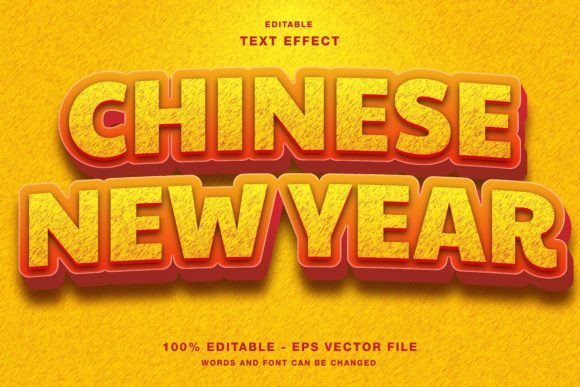
A Chinese New Year Text Effect is not merely a font; it is a comprehensive stylistic treatment applied to typography. These effects typically incorporate traditional motifs such as gold foil textures, red lantern glows, paper-cut styles, or intricate border patterns that are synonymous with the Spring Festival. Unlike standard typefaces, which only define the shape of letters, a text effect includes layer styles, shadows, gradients, and decorative elements that give the text depth and cultural resonance.
The specific template discussed here is designed for Adobe Illustrator, a vector-based software widely regarded as the industry standard for scalable graphic design. By providing an editable framework, it allows users to input their own copy—whether it is a sale announcement, an event title, or a social media headline—while retaining the complex visual styling. The inclusion of both EPS and JPG files ensures compatibility across different workflows, catering to those who need fully editable vectors and those who require quick-to-use raster images.
Comparing Template-Based Effects vs. Custom Design
When deciding how to approach holiday-themed graphics, professionals often weigh the benefits of using a pre-made template against creating custom artwork from scratch. Understanding this tradeoff is essential for resource allocation.
- Time Efficiency: Creating a high-quality, culturally accurate text effect from scratch can take several hours, involving texture mapping, lighting adjustments, and vector tracing. A Chinese New Year Text Effect template reduces this process to minutes, allowing teams to focus on strategy and distribution rather than execution.
- Consistency: Templates ensure a uniform look across multiple assets. If you are running a campaign across Instagram, Twitter, and Facebook, using the same underlying text style helps reinforce brand recognition during the festive period.
- Cost-Effectiveness: Hiring a senior illustrator for custom holiday assets is expensive. For small businesses or internal marketing teams, a customizable template offers a professional finish at a fraction of the cost.
However, custom design remains superior for large-scale brand campaigns where uniqueness is paramount. If your brand identity strictly prohibits generic stylistic elements, a bespoke approach may be necessary. For most mid-tier promotions, flyers, and digital posts, the template offers a balanced compromise between quality and speed.
Technical Considerations: RGB Color Mode and File Formats
One critical aspect of this specific template is its color mode: RGB. This designation is vital for users to understand before purchasing or downloading. RGB (Red, Green, Blue) is the color model used for digital screens. It produces vibrant, glowing colors that look excellent on smartphones, monitors, and tablets. This makes the template ideal for:
- Social media promotions on platforms like Instagram and Facebook.
- Web design headers and banner ads.
- Digital newsletters and email marketing campaigns.
- On-screen presentations for events.
It is important to note a key limitation: RGB is not suitable for professional offset printing. If you intend to use this text effect for high-volume printed magazines, posters, or flyers, you must convert the file to CMYK (Cyan, Magenta, Yellow, Key/Black) within Illustrator. While the template includes JPG files which can be used for basic home printing or digital proofs, serious print production requires careful color management to avoid dull or inaccurate colors. Users should verify their printer’s requirements before finalizing any physical publication promotion.
Versatility Across Media Channels
The strength of an editable Illustrator template lies in its adaptability. Because the elements are vector-based, they can be scaled infinitely without losing quality. This scalability makes the Chinese New Year Text Effect suitable for a wide range of formats, from tiny mobile icons to large-format event papers.
Social Media and Digital Marketing
In the fast-paced environment of social media, visual appeal stops the scroll. The intricate details of a gold-and-red text effect stand out against the minimalist interfaces of Twitter and Instagram. Since the template is fully customizable, marketers can quickly swap out text to match daily deals or countdowns. The RGB color profile ensures that the metallic golds and deep reds appear vibrant on LED screens, enhancing click-through rates for holiday promotions.
Print Publications and Event Materials
For physical media such as flyers, posters, and magazine ads, the vector nature of the EPS files is advantageous. Designers can adjust the stroke weights and spacing to ensure legibility at various sizes. While the initial file is in RGB, the vector paths allow for easy recoloring to CMYK if needed. This flexibility makes the template a viable option for local event promotions, restaurant menus, or retail store signage, provided the user performs the necessary color conversion.
Decision Factors: Is This Template Right for You?
Choosing the right design resource depends on your specific project requirements, technical skills, and timeline. Here is a practical framework to help you decide if this Chinese New Year Text Effect is the appropriate tool.
Choose this template if:
- You need to produce multiple variations of holiday graphics quickly.
- Your primary distribution channel is digital (web, social, email).
- You have basic proficiency in Adobe Illustrator and want to customize layers.
- You are looking for a cost-effective alternative to hiring a specialist designer.
Consider alternative options if:
- Your project requires strict CMYK color accuracy for high-end offset printing without any post-processing.
- You need a completely unique, one-of-a-kind artistic direction that does not rely on common festive tropes.
- You do not have access to vector editing software and prefer drag-and-drop tools like Canva (though JPGs from this pack could still be useful).
Maximizing the Value of Editable Elements
To get the most out of this resource, users should leverage the editable nature of the file. Do not simply replace the text; experiment with the hierarchy. Use the text effect for headlines while keeping body copy clean and simple to maintain readability. Since the template includes separate elements, you can also deconstruct the design. For instance, you might use just the golden border element as a frame for a photo, or isolate the decorative icons for use as bullet points in a newsletter.
Furthermore, consider the context of your audience. While the red and gold palette is traditional, modernizing the font choice within the template can appeal to younger demographics. Combining traditional textures with contemporary sans-serif typefaces can create a fusion style that feels both respectful of tradition and relevant to modern consumers.
Final Thoughts on Strategic Design Choices
The Chinese New Year Text Effect represents a practical solution for modern content creation. It acknowledges the need for speed and consistency in digital marketing while providing the aesthetic depth required for cultural celebrations. By understanding its technical specifications, particularly the RGB color mode and vector editability, designers and marketers can make informed decisions about its application.
Whether you are designing a quick Instagram story or a detailed event flyer, this template serves as a strong foundation. It allows you to focus on the message and the strategy, confident that the visual execution meets professional standards. As with any design tool, its value is determined by how well it aligns with your specific goals, audience expectations, and production capabilities. Use it wisely, adapt it creatively, and let it enhance your festive communications.