Enjoy Google Slides Template: A Minimalist Tool for Clearer Business Presentations
Let’s be honest about the state of modern presentations. We have all sat through slides that were cluttered, confusing, or visually exhausting. Whether you are pitching to investors, teaching a class, or updating your team on quarterly goals, the medium matters just as much as the message. This is where the Enjoy Google Slides Template steps in. It is not just another download; it is a design solution built for people who need to communicate clearly without spending hours fiddling with alignment tools or color palettes.
Designed with a minimalist aesthetic, this template strips away the noise. It focuses on what actually matters: your data, your narrative, and your audience’s understanding. For entrepreneurs, marketers, educators, and freelancers, having a reliable, professional-looking deck ready to go can save valuable time and reduce the anxiety that often comes with public speaking or client meetings.
Why Minimalism Works in Professional Settings
Minimalism in design is not about lacking content; it is about removing distractions. The Enjoy Google Slides Template utilizes ample white space, clean typography, and a structured layout to guide the viewer’s eye. When you use a template like this, you are making a conscious choice to prioritize readability.
Consider the typical corporate environment. Decision-makers are busy. They do not have time to decipher complex animations or hunt for key points in a wall of text. With a 16:9 Full HD ratio (1920x1080px), this template ensures that your content looks crisp on modern monitors, projectors, and laptops. The high-resolution graphics are fully resizable, meaning you can adapt charts and images without losing quality. This flexibility is crucial when you need to repurpose content for different screens or print materials.
Real-World Use Cases for Different Professionals
One of the strongest aspects of this template is its multipurpose nature. It was created with both technical and non-technical users in mind, which means it adapts well to various industries. Here is how different users might leverage this tool in their daily workflows.
For Entrepreneurs and Startups
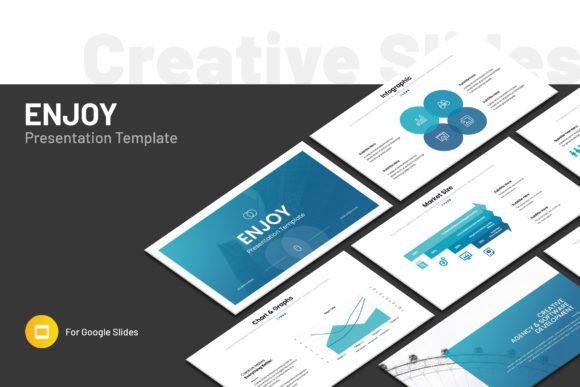
If you are seeking funding or partnering with other businesses, your pitch deck needs to look polished from day one. The Enjoy Google Slides Template includes infographic elements and chart layouts that allow you to present market growth, revenue projections, and user acquisition stats clearly. Instead of struggling to build a bar graph from scratch, you can simply drag and drop your data into pre-designed slots. This allows you to focus on refining your pitch rather than fighting with software.
For Marketers and Content Creators
Marketers often need to present campaign results, social media analytics, or content calendars. The included maps and icons are particularly useful here. You can visualize geographic reach or break down demographic data using the provided graphic elements. Because the template uses free fonts, you do not have to worry about licensing issues or missing typefaces when sharing files with clients or external agencies. Everything remains consistent, regardless of who opens the file.
For Educators and Trainers
Teachers and corporate trainers know that engagement drops when slides are text-heavy. This template offers 36 slides in total, providing enough variety to structure a full lesson or workshop. You can use the master slide layouts to maintain consistency across modules while changing content easily. The "easy drag and drop" feature means you can quickly swap out placeholder images for relevant diagrams, historical photos, or scientific illustrations. It supports both Apple and Windows users, ensuring that whether you are teaching in a Mac lab or a PC conference room, the presentation runs smoothly.
No Technical Skills Required
A common barrier to creating great presentations is the perceived learning curve of design software. Many people assume they need to be experts in Adobe Illustrator or PowerPoint to make something look good. The Enjoy Google Slides Template disproves this. It is designed for online editing via your web browser. If you can use Google Docs, you can use this template.
The structure is intuitive. All graphic elements are editable, and the help file provides links to the free fonts used, ensuring you can replicate the look exactly. There is no need to install complex plugins or learn new interfaces. You simply open the link, start typing, and replace the placeholders. This accessibility makes it an excellent choice for small business owners who wear many hats and do not have a dedicated design team.
What to Consider Before You Start
While the template is robust, it is important to approach it with a clear plan. Before you begin editing, gather your content. Know your key messages, have your images ready, and prepare your data. Since the template relies on minimalism, every element you add should serve a purpose. Do not feel compelled to fill every slide if the story can be told in fewer.
Also, remember that images are not included in the download. This is actually a benefit, as it allows you to choose visuals that are specific to your brand or topic. However, it does mean you need to source high-quality photos beforehand. Using low-resolution images will detract from the clean look of the template. Stick to professional stock photos or your own high-quality photography to maintain the premium feel.
Support and Reliability
Even with user-friendly tools, questions can arise. Perhaps you are unsure how to adjust a specific chart or want to change the color scheme to match your brand guidelines. The creators of the Enjoy Google Slides Template provide free real support from skilled designers. This level of customer care is rare in the digital product space and adds significant value. Knowing that you can contact someone for help reduces the risk of getting stuck mid-project.
This support system is particularly helpful for those who are new to Google Slides. While the interface is simple, mastering the master slides and understanding how global changes affect individual slides can take some practice. Having a direct line to the designers ensures that you can resolve technical hiccups quickly and get back to focusing on your content.
Making the Most of Your Presentation
Ultimately, a template is only as good as the story it tells. The Enjoy Google Slides Template provides the framework, but you provide the soul. Use the infographic elements to simplify complex ideas. Use the charts to highlight trends rather than just displaying raw numbers. Use the clean layout to let your spoken words carry the weight of the presentation.
Whether you are a freelancer sending a proposal, a teacher explaining a concept, or a CEO outlining a vision, clarity is king. This template removes the friction between your ideas and your audience. It allows you to present with confidence, knowing that your visual aid is working with you, not against you. By choosing a tool that prioritizes ease of use and professional aesthetics, you invest in better communication. And in today’s fast-paced world, being understood quickly and clearly is a competitive advantage worth having.
So, before your next big meeting or class, consider downloading this template. Spend less time designing and more time refining your message. Your audience will thank you for the clarity, and you will thank yourself for the saved time.