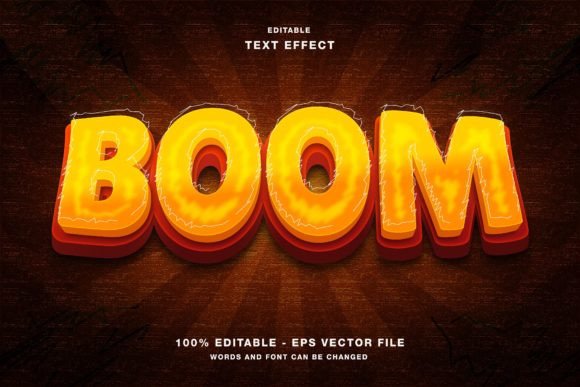
Mastering the BOOM 3D Editable Text Effect for High-Impact Visuals
In the fast-paced world of digital marketing and graphic design, capturing attention within the first few seconds is not just an advantage; it is a necessity. Whether you are crafting a headline for a social media promotion on Instagram, designing a bold poster for an upcoming event, or laying out a magazine spread, typography plays a pivotal role in communication. This is where the BOOM 3D editable text effect becomes an invaluable asset for creators of all skill levels. It offers a professional, three-dimensional aesthetic that stands out against flat designs, yet it remains fully customizable to fit your specific brand identity.
However, many designers and marketers make critical errors when integrating such powerful tools into their workflow. These mistakes often stem from a misunderstanding of file formats, color modes, or the limitations of editable vectors. By understanding these common pitfalls, you can ensure that your final output is not only visually stunning but also technically sound for its intended platform.
Understanding the Core Value of Editable 3D Typography
The primary appeal of the BOOM 3D text effect lies in its balance between complexity and ease of use. Traditional 3D lettering requires advanced knowledge of lighting, perspective, and rendering software, which can be time-consuming and difficult to master. In contrast, this resource provides a pre-built structure where the heavy lifting has already been done. You receive a template where every element is separated and organized, allowing you to swap out the placeholder text with your own message instantly.
This efficiency is crucial for professionals who need to produce high-quality assets quickly. For instance, a small business owner promoting a flash sale on Twitter or Facebook needs graphics that look premium but can be created in minutes, not hours. Similarly, educators creating engaging presentation slides or freelancers working on tight deadlines benefit from having a reliable, high-impact text style at their disposal. The key is recognizing that "editable" means you have control over the content, but you must respect the underlying structure to maintain the visual integrity of the 3D effect.
Common Mistakes and How to Avoid Them
Even with user-friendly tools, errors can compromise the quality of your design. Here are some frequent misunderstandings and practical ways to correct them.
Ignoring Color Mode Requirements
One of the most overlooked details in digital design is the color mode. The BOOM 3D editable text effect is optimized for the RGB color space. This is ideal for web designs, social media posts, and digital publications because screens emit light, and RGB covers the vibrant spectrum visible on monitors and mobile devices. A common mistake is attempting to use these files for offset printing without converting them properly, or worse, expecting CMYK vibrancy on a screen. If you are designing a flyer or poster that will be printed professionally, you must understand that RGB colors may shift when converted to CMYK. Always check your final output destination. For digital promotions on Instagram or Twitter, sticking to RGB ensures your colors remain bright and true to the original design.
Mishandling Vector Layers in Illustrator
Since this tool is designed for Adobe Illustrator, users often make the mistake of rasterizing layers too early or breaking the link between the text and the 3D effects. The file includes EPS and JPG formats, but the true power lies in the vector EPS file. Beginners sometimes expand the appearance of the text immediately, which makes it uneditable. If you change your mind about the spelling or font later, you would have to start over.
Better approach: Keep the live text layer intact until the very final stage of your design process. Use the appearance panel to adjust strokes, fills, and 3D extrusions non-destructively. This allows you to tweak the depth, angle, and lighting of the 3D effect without losing the ability to edit the characters themselves.
Overlooking Readability for Style
The "BOOM" aesthetic is bold and loud. While this is perfect for headlines and attention-grabbing headers, it can be detrimental if used for body text or lengthy paragraphs. A frequent error is applying this heavy 3D effect to small text sizes, resulting in a cluttered and unreadable mess. This negatively affects communication, especially on mobile devices where screen real estate is limited.
Practical advice: Reserve this text effect for short, punchy phrases. Use it for main titles on event papers, magazine covers, or social media graphics. Pair it with clean, simple sans-serif fonts for supporting information to create a balanced hierarchy. This ensures that the 3D element draws the eye without overwhelming the viewer.
Evaluating Usability and File Integrity
Before committing to any design asset, it is wise to evaluate its flexibility. The BOOM 3D text effect includes both EPS and JPG files in the main folder. The JPG serves as a quick preview or a ready-to-use image for platforms that do not support vector editing. However, relying solely on the JPG limits your customization options. You cannot change the text or adjust the colors precisely if you only have a raster image.
To maximize value, always work from the EPS file in Illustrator. Check that all elements are grouped logically. A well-structured file will have separate layers for shadows, highlights, and the base text. If you find that changing the text breaks the 3D illusion, it is likely due to a mismatch in font styles or missing glyphs. Ensure you are using a font that supports all the characters in your message. If the template uses a specific bold font, switching to a thin script font may not yield the same volumetric result. Stick to fonts with sufficient weight to carry the 3D extrusion effectively.
Strategic Application for Different Platforms
Different platforms have different requirements. For Instagram and Facebook, square or vertical formats work best. When adapting the BOOM 3D text for these channels, ensure the text is centered and large enough to be read on small screens. For Twitter, where images are often viewed in a feed alongside text, keep the background clean to let the 3D text pop. For print materials like flyers and posters, ensure your resolution is set to 300 DPI if you are exporting from Illustrator to a raster format for the printer, even though the source is vector. This prevents pixelation around the edges of the 3D effects.
By avoiding these common pitfalls and understanding the technical nuances of the BOOM 3D editable text effect, you can elevate your design work significantly. It is not just about adding a cool effect; it is about using the right tool in the right way to communicate your message clearly and professionally. Whether you are a seasoned designer or a beginner looking to make a strong visual impact, mastering these details will save you time, reduce frustration, and result in higher-quality promotional materials.